Zindi ran a challenge predicting bus ticket sales into Nairobi. It is now closed, but we can still make predictions and see how they would have done. This was a very quick attempt, but I wanted to try out CatBoost, a magical new algorithm that’s gaining popularity at the moment.
With a little massaging, the data looks like this:
The ‘travel_time’ (in minutes) and ‘day’ columns were derived from the initial datetime data. I’ll spare you the code (it’s available in this GitHub repo) but I pulled in travel times from Uber Movement, and added them as an extra column. The test data looks the same, but lacks the ‘Count’ column – the thing we’re trying to predict. Normally you’d have to do extra processing: encoding the categorical columns, scaling the numerical features… luckily, catboost makes it very easy:
Training the model
This is convenient, and that would be enough reason to try this model first. As a bonus, they’ve implemented all sorts of goodness under the hood to do with categorical variable encoding, performance improvements etc. My submission (which took half an hour to implement) achieved a score of 4.21 on the test data, which beats about 75% of the leaderboard. And this is with almost no tweaking! If I spent ages adding features, playing with model parameters etc, I have no doubt this could come close to the winning submissions.
In conclusion, I think this is definitely a tool worth adding to my arsenal. It isn’t magic, but for quick solutions it seems to give good performance out-of-the-box and simplifies data prep – a win for me.
This was a short post since I’m hoping to carry on working on the AI Art contest – expect more from that tomorrow!
I studied Electrical and Computer Engineering at UCT, and the final year project was my chance to really dive deep into a topic. I chose IR tomography, and explored various questions around that topic. For today’s post, I’ll focus on one small aspect: the use of machine learning. This post will go through some background and then show a couple of ML models in use. For much more detail and my full thesis, see this GitHub repository.
Background
This project arose because I wanted to do some experiments with Computed Tomography, but I didn’t know enough to see what would work and what wouldn’t. How many sensors does one need to achieve a particular goal for resolution or performance? What geometries work best? And what if we can’t keep everything nice and regular?
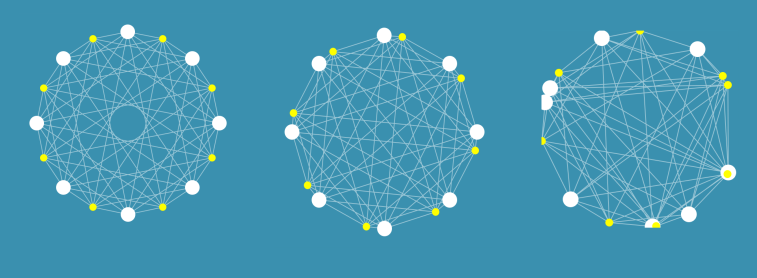
I built some tools that let me simulate these kinds of arrangements, and did some early experiments on image reconstruction and on the use of machine learning (specifically neural networks) to make sense of readings. Even with a weird arrangement like the one on the right, I could make some sense of the data. For more information on the simulation side, see the report in the GitHub repository.
I tested out these arrangements in the real world by building some fixed arrangements, and by using a 3D printed scanner to position an LED and a phototransistor (PT from now on) in different locations to slowly simulate having many detectors and emitters. Using light as opposed to X-rays means cheap emitters and detectors, and of course much less danger.
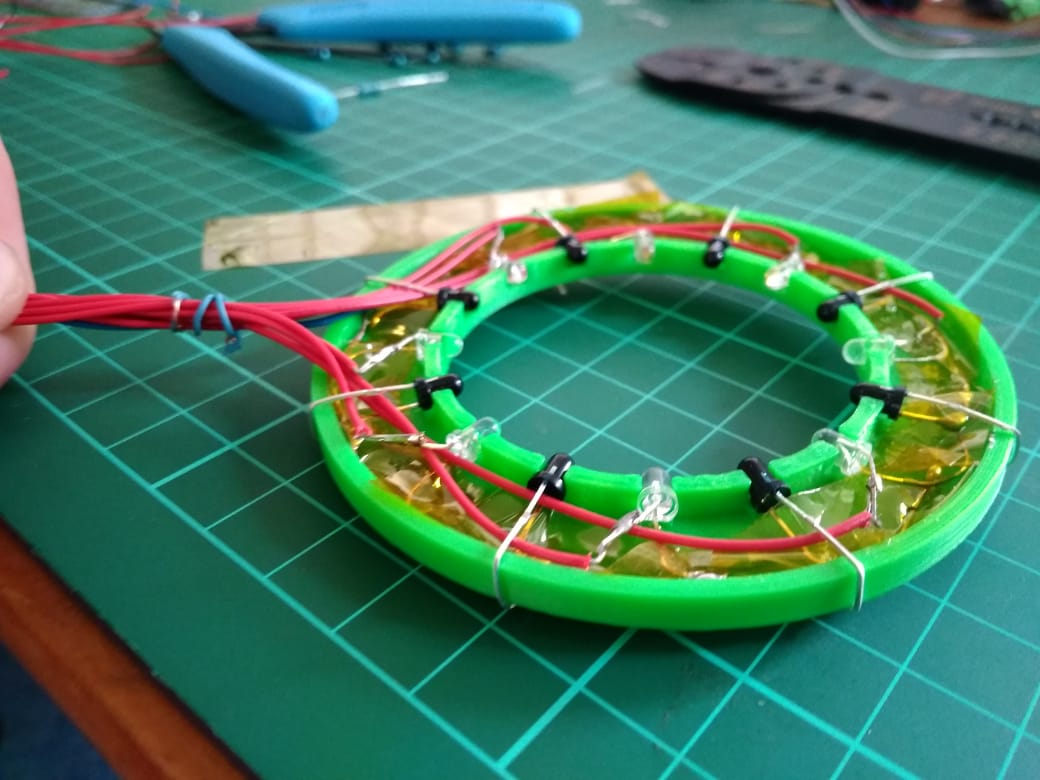
A ring of 8 LEDs and 8 PTs. Larger rings were also constructed, and the scanner could simulate arrangements of >1000 sensors and emitters.
By taking a set of readings, we can start to estimate how much light travels along different paths, and thus build up an image of whatever is being scanned. This works well with lots of readings from the scanner:
A reconstructed image of some small nails. The scanner could resolve objects less than 1mm in size.
However, for arrangements with relatively few sensors (such as the static arrangement of 8 shown above), the reconstructed images are an apparently meaningless blur. The goal of this project was to use ML to make sense of these sets of readings, for example by identifying objects placed within the sensor ring or estimating their position.
Model Selection
To answer the question “can machine learning be useful”, I needed to pick a good approach to take. Simply throwing the data at a decision tree and then noting the performance wouldn’t cut it – every choice needs to be justified. I wrote a notebook explaining the process here, but the basics are as follows:
Define your problem (for example, classifying objects) and load the data
Pick a type of model to try (for example, Logistic Regression)
Train a model, and see how well it performs by splitting your data into training and testing sets. Use cross-validation to get more representative scores.
Tune the model parameters. For example, try different values on ‘gamma’ (a regularisation parameter) for a Support Vector based classifier.
Repeat for different types of model, and compare the scores
Choosing the optimum number of hidden layers for a Multi-Layer Perceptron model (Neural Network)
For example, in the case of object classification, a neural network approach worked best (of the models tested):
Model scores on a classification task
Object Classification
Using the ring with 8 LEDs and 8 PTs, I’d place an object randomly within the ring. The object (one of four used) and location (which of four ‘quadrants’ contained the object) were recorded along with a set of readings from the sensors. This data was stored in a csv file for later analysis.
Using the model selected according to the method in the previous section, I was able to achieve an accuracy of 85% (multi-class classification) or 97% (binary classification with only two objects) using 750 samples for training. More training data resulted in better accuracy.
Model performance with more training samples for multi-class classification (orange) and binary classification (blue)
This was a fun result, and a good ML exercise. The data and a notebook showing the process of loading the data and training models can be found in the ‘Model Selection’ folder of the GitHub repository.
Position Inference
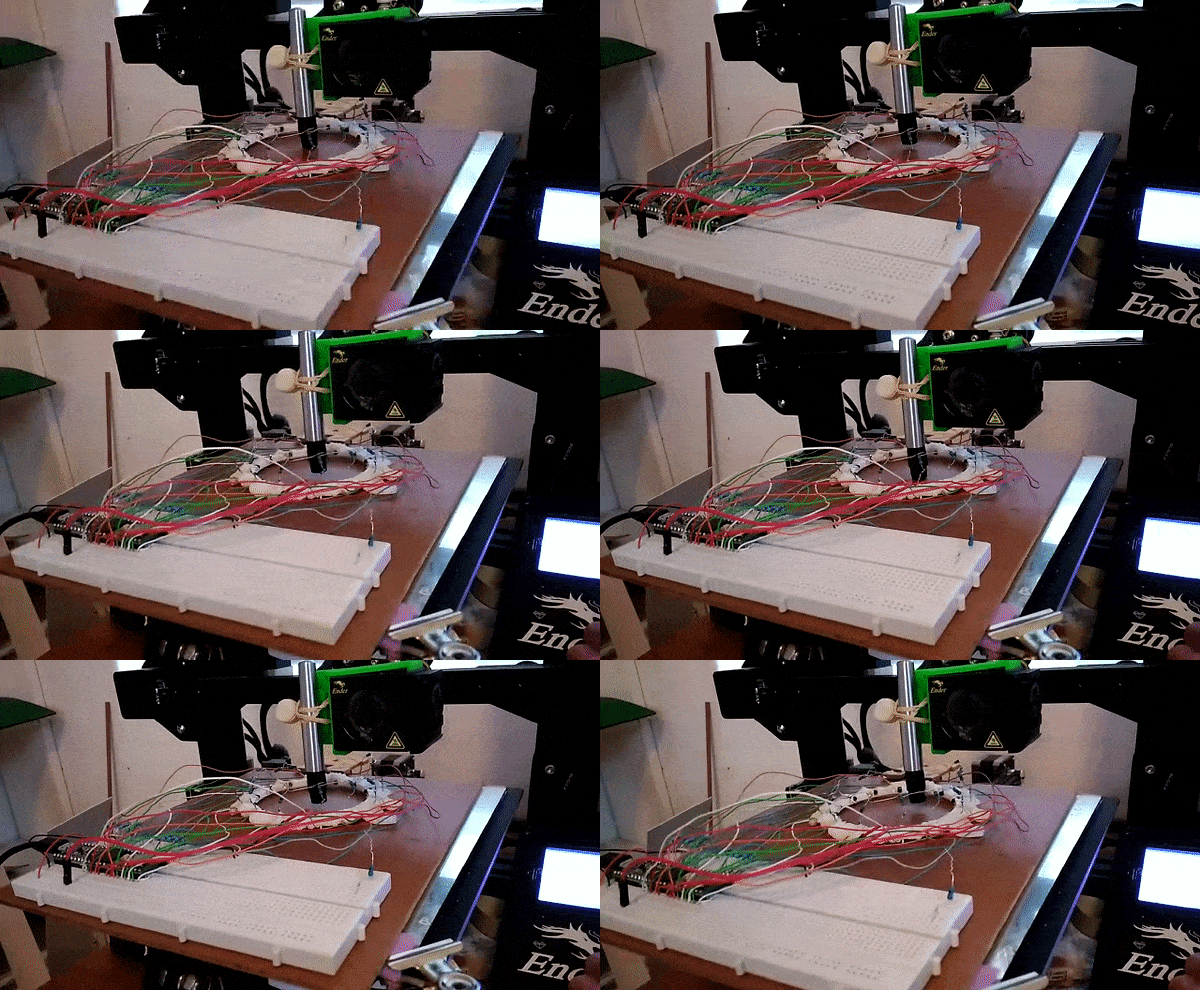
Here, instead of trying to identify an object we attempt to predict it’s location. This requires knowing the position precisely when collecting training data – a problem I solved by using a 3D printer to move the object about under computer control.
Gathering training data for position inference
This results in a dataset consisting of a set of readings followed by an X and Y position. The goal is to train a model to predict the position based on the readings. For the ring of 8, the model could predict the location with an error of ~10% of the radius of the ring – approximately 7mm. For the ring of 14 (pictured above, and the source of the linked dataset), I was able to get the RMSE down to 1.6mm (despite the ring being larger) using the tricks from the next section. You can read more about this on my hackaday.io page.
Playing a game with the sensor ring.
The ring can take readings very fast, and being able to go from these readings to a fairly accurate position opens up some fun possibilities. I hooked it up to a game I had written. A player inserts a finger into the ring and moves it about to control a ‘spaceship’, which must dodge enemies to survive. It was a hit with my digs-mates at the time.
Using Simulation to boost performance
One downside of this approach is that it takes many training samples to get a model that performs adequately. It takes time to generate this training data, and in an industrial situation it might be impossible to simulate all possible positions in a reasonable time-frame. Since I already had a simulator I had coded, why not try to use it to generate some fake training data?
Using purely simulated data resulted in some spectacularly bad results, but if a model was ‘primed’ with even a small real-world training dataset (say, 50 samples) then adding simulated data could improve the model and make it more robust. I’ll let the results speak for themselves:
Model performance for position inference with and without simulated data for training
The simulator didn’t map to real life exactly, and no doubt could be improved to offer even more performance gains. But even as-is, it allows us to use far less training data to achieve the same result. Notice that a model trained on 150 samples does worse than one using only 50 samples but augmented with extra simulated data. A nifty result to keep in mind if you’re ever faced with a dataset that’s just a little too small!
Conclusions
I had a ton of fun on this project, and this post only really scratches the surface. If you’re keen to learn more, do take a look at the full report(PDF) and hackaday project. This is a great example of machine learning being used to get meaningful outputs from a set of noisy, complicated data. And it shows the potential for using simulation of complex processes to augment training data for better model performance – a very cool result.
I’m thinking about moving this website in a different direction as I start on a new project – stay tuned for news!
In the previous two posts, we built a Species Distribution Model and used it to predict the density of Baobab trees in Zimbabwe. Then we tried some more complex models, trained a decision tree regressor and imported it into Google Earth Engine. We showed various metrics of how well a model does, but ended with an open question: how to we tell how well the model will do when looking at a completely new area? This is the subject we’ll tackle in today’s post.
The key concept here is distance from the sample space. We sampled at a limited number of geographic locations, but there is no way these locations completely cover all possible combinations of temperature, rainfall, soil type and altitude. For example, all samples were at altitudes between 300 and 1300m above sea level. We might expect a model to make reasonable predictions for a new point at 500m above sea level. But what about a point at 290m elevation? Or 2000m? Or sea level? Fitting a linear model based purely on altitude, we see the problem clearly:
Line of best fit: Elevation vs Density
Negative tree densities at high altitude? Insanely high densities at sea level? Clearly, extrapolating beyond our sample space is risky. Incidentally, if it looks to you like there are two Gaussian distributions there in the data you are not alone – they might correspond to the two types* of baobabs found on mainland Africa. Until recently, conventional wisdom held that there is only one species present, and this is still contested. See a related paper I worked on here [1]. A more complex model might help, but that’s besides the point. A model’s predictions are only valid for inputs that are close enough to the training data for extrapolation to make sense.
So how do we deal with this? A simple approach might be to define upper and lower bounds for all input variables and to avoid making predictions outside of the range covered by our training data. We can do this in GEE using masking:
Black areas fall within 80% bounds for all variables
This is a reasonable approach – it stops us doing much dangerous extrapolating outside our sample space and has the added benefit of clearly conveying the limitations of the model. But we can do better. Imagine an area that is almost identical to some of our training data, but differs in a few attributes. Now further imagine that none of these attributes matter much to baobabs, and in any case they are only just below our thresholds. Surely we can expect a prediction in this area to have some value? We need a way to visualise how far away a point is from our sample space, so that we can infer how bad our predictions for that point are likely to be.
Enter what I call the |Weighted Distance Vector|. We represent each input as a dimension. We consider how far away a point is from our sample space along each dimension, and compute the vector sum of these distances. I say the ‘weighted’ sum since we can scale the distance on each axis to reflect the relative importance of that variable, attaching higher weight to variables with larger effects on the output. Let’s clarify with an example.
Considering only two variables, elevation and temperature, we can represent all our training data as points (blue) on a grid where the X axis represents elevation and the y axis temperature. We’ll draw out our limits around the training data using bounds covering 90% of our data. A point within the limits has a |WDV| of 0. Now consider a point outside the limits (red). It’s 250m higher than any we’ve seen – 0.25 times the range of elevations observed. It’s 2.5 degrees cooler than any of our sampled locations, which is 0.3 times the upper-lower bounds for temperature. The distance is sqrt(0.25^2 +0.3^2) = 0.39. However, altitude has a large influence on distribution, while temperature does not. Scaling by appropriate weights (see the penultimate paragraph for where these come from) we get |WDV| = sqrt((0.173*0.25)^2 +(0.008*0.3)^2) = 0.043. The key point here is that the |WDV| captures the fact that elevation is important. A point at 750m elevation with a mean temp of 30 °C will have a low |WDV| (0.005), while one with a mean temp of 23 °C but an altitude of 1600m will have a high |WDV| (0.02).
A point outside our sampled region
To do this in GEE is fairly simple, since we can map functions over the input images to get the |WDV| at each location. This script shows it in action. And the result gives us much more information than the mask we made earlier. Red areas have a very small |WDV|, and we expect our model to do well there. White areas are out of scope, and I’d take predictions in the yellow regions with a grain of salt. What isn’t included here is geographical distance – extrapolating to different continents, even if conditions match, is not advised.
|WDV| over Southern Africa. Red areas are similar to sampled regions, white are not.
One thing I’ve glossed over so far: how do we get the weights used? I defined the |WDV| as weighted because we “scale the distance on each axis to reflect the relative importance of that variable.” The feature weights can be thumb-sucked by an expert (I’ve seen this done) but the easiest way to get reasonable weights is to look at the model.feature_importances_ variable of a trained random forest regressor. In the process of fitting the model, the relative importance of each input feature is computed, so we get this info for free if we’ve done the modelling as described in Part 2. Another option would be to use the correlation coefficients of each input var with the density. I leave that as an exercise for the reader.
So there you go – a way to visualise how applicable a model is in different locations, using weighted distance from sample space as a metric. In the next post of this series I’ll share the method I’m using to expand our sample space and get a model that can produce useful predictions over a much wider area. Before then, I’m going to take a break from baobabs and write up some other, smaller experiments I’ve been doing. See you then!
*I’m using ‘type’ instead of ‘species’ here, because while the genetics are contentious, it is fairly clear that there are at least two kinds of baobabs here.
[1] – Douie, C., Whitaker, J. and Grundy, I., 2015. Verifying the presence of the newly discovered African baobab, Adansonia kilima, in Zimbabwe through morphological analysis. South African Journal of Botany, 100, pp.164-168.






 Data Science Castnet